
Tax Scams 2026: How to Spot a Fake CRA Email or Text Message
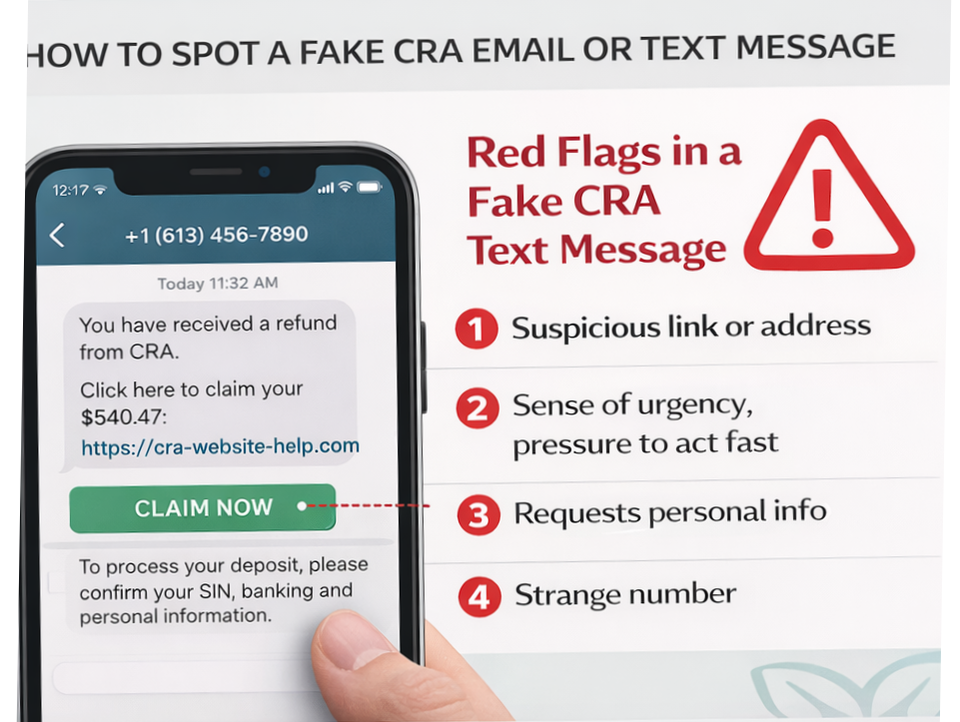
As we enter the 2026 tax season, the Canada Revenue Agency (CRA) is reporting a surge in high-tech fraud. Scammers have upgraded their toolkit with Generative Artificial Intelligence (GenAI) to create near-perfect replicas of government websites and "cloned" voices of agents that can trick even the most cautious taxpayers.
For newcomers awaiting their first tax refund and families tracking their CCB payments, these messages can look incredibly convincing. However, knowing the "Golden Rules" of how the government actually communicates will keep your money safe.
This is the Official 2026 Security Guide. We decode the mechanics of the newest scams, provide a checklist for identifying fake messages, and show you exactly how the CRA will—and will never—contact you.
Quick Answers: Identifying CRA Scams
How do I know if a CRA text message is real?
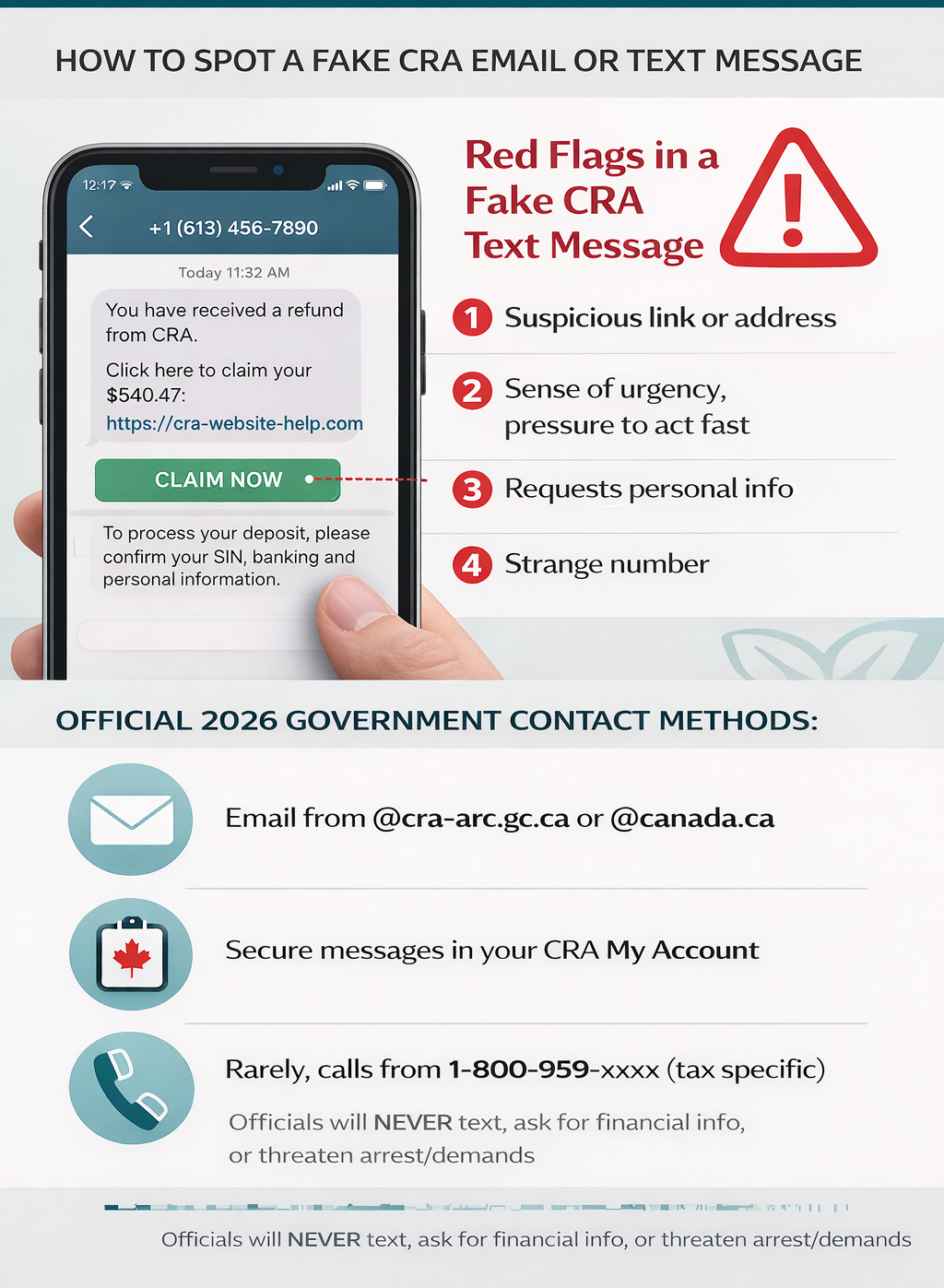
In 2026, the CRA only sends text messages for Multi-Factor Authentication (MFA) codes when you are actively logging in. They will never text you a link to "claim" a refund, verify your bank info, or notify you of a GST/HST credit increase. If you receive a text with a link, it is 100% a scam.
Will the CRA call me and threaten arrest?
No. The CRA does not use aggressive language. They will never threaten to send the police to your door, deport you, or put you in prison during a phone call. While tax debt is serious, the legal process involves multiple written letters (Notices of Assessment) before any legal action occurs.
What is the official CRA phone number to verify a call?
If you receive a suspicious call, hang up and call the official CRA individual enquiries line at 1-800-959-8281. If the call was legitimate, the agent will see a note on your file.
The "Big Three" Golden Rules of CRA Communication
To stop a scammer in their tracks, remember these three things the CRA will never do. These are the absolute boundaries of official government behavior.
1. No e-Transfers or Texted Refunds
The CRA will never send your Canada Carbon Rebate or tax refund via Interac e-Transfer. All payments are made either through Direct Deposit (which you set up inside your secure portal) or by a physical cheque mailed to your home address. If a message asks you to "Accept your e-Transfer," delete it.
2. No Payment via Crypto or Gift Cards
If a "CRA agent" asks you to pay a tax debt using Bitcoin, Ethereum, Apple Gift Cards, or prepaid credit cards, it is a fraud attempt. The CRA only accepts payments through your bank's "Pay Bills" function, pre-authorized debit, or at a Canadian financial institution.
3. No Request for Passport or Health Card Numbers
The CRA may ask for your SIN, name, and date of birth to verify your identity over the phone, but they will never ask for your passport number, driver's license, or health card details to "unlock" a refund. These documents are handled by Service Canada or your province, not the tax agency.
New for 2026: AI Voice Cloning Scams
The most dangerous development in 2026 is the use of AI Voice Cloning. Scammers can now use a 3-second clip of a real person's voice—often taken from social media or a previous "harmless" phone call—to generate an entire professional-sounding conversation.
- The "Cloned Agent" Call: You might receive a call that sounds like a professional Canadian government employee. They may even use your name and reference a "case number" from a previous reconsideration request to build trust.
- The Red Flag: If the "agent" pressures you to act immediately, demands that you do not hang up, or uses a tone that creates panic, it is a scam.
- The Fix: Hang up. If you are worried, log in to your CRA My Account to check for notifications. Any real issue will be listed there in writing under the "Messages" tab.
How to Spot a Fake Carbon Rebate Text
With the quarterly payment dates being high-traffic events, scammers send mass texts during the "rebate weeks" in January, April, July, and October.
A typical scam text looks like this:
"CRA: Your 2026 Carbon Rebate of $225.00 is waiting. Click here to deposit: [bit.ly/fake-cra-link]"
Why this is a scam:
- The Link: The CRA does not use URL shorteners like bit.ly, tinyurl, or .info domains.
- The Deposit: You never have to "click" to deposit government money; it happens automatically via autodeposit if you are eligible.
- The Timing: Scammers often send these the day before the actual payment date to catch people who are anxious about their money.
The 2026 "Ghost Return" Fraud
In 2026, many Canadians are falling victim to "Ghost Returns." This is when a scammer uses a stolen SIN to file a fake tax return in February—before you file your real one—to steal your refund.
How to prevent this:
- File Early: Netfile opens on February 23, 2026. Filing your return as early as possible "locks" your SIN for the year, making it impossible for a scammer to file a second one.
- Email Notifications: Ensure "Email Notifications" are turned ON in your account. If a "Ghost" files a return or changes your address, the CRA will email you instantly, allowing you to stop the fraud before the money is sent.
The February 2026 Backup MFA Requirement
Starting in February 2026, the CRA requires all My Account users to have a backup multi-factor authentication (MFA) option on file. This mandatory update is designed to prevent account lockouts if a user loses access to their primary phone number. Users must choose between a Passcode Grid or a Third-Party Authenticator App (like Google Authenticator) as their secondary verification method.
Many users will find themselves temporarily locked out of their accounts in early 2026 because they didn't set up this backup. Scammers are already taking advantage of this by sending fake "Account Recovery" emails.
How to Securely Add a Backup MFA:
- Sign in to your official CRA My Account.
- Go to "Security Settings" on the Welcome page.
- Select "Multi-factor authentication."
- Follow the prompts to generate a Passcode Grid. Print this grid or save it in a secure, offline location. This grid allows you to log in even if your phone is stolen or your SIM card is swapped.
Reporting "World Income" Phishing
Newcomers are specifically targeted with scams regarding their foreign income reporting. Scammers will call pretending to be from the "International Tax Division" and ask for a list of foreign assets to "calculate your CCB back-pay."
The Truth: The CRA only verifies foreign income through your tax return (Form T1135) or through formal written letters. They will never ask for a detailed list of foreign bank account numbers or property values over an unsolicited phone call. If someone asks for your "UCI" (Unique Client Identifier) or immigration file number over a tax call, hang up immediately—this is a classic identity theft move.
The "Direct Deposit" Update Scam
This scam involves an email stating: "Your direct deposit information has been changed. If you did not do this, click here to revert the change." The link leads to a fake login page that steals your password and MFA code in real-time.
How to safely verify:
Instead of clicking the link in the email, open a new browser tab and type canada.ca directly into the address bar. Log in to your account manually. If your direct deposit was actually changed, you will see a red notification at the top of your dashboard. If not, the email was a phishing attempt.
Recognizing GenAI Tax Schemes
Generative AI (GenAI) has removed the obvious "spelling mistakes" that used to give scammers away. In 2026, look for these more subtle GenAI errors:
- Fuzzy Logos: The Government of Canada logo may look slightly blurry or have the wrong proportions.
- Awkward Phrases: Using terms like "Revenue of Canada" or "The Tax Bureau" instead of "Canada Revenue Agency."
- Urgency Overload: Demanding action within "2 hours" to avoid "immediate deportation"—legal processes in Canada never move that fast.
Emergency Rent Bank Scams
With the rise in popularity of Emergency Rent Banks, scammers are sending texts offering "Instant $680 Rent Support Grants." They ask you to "Verify your eligibility" by logging into your bank via their link.
The Reality: Real Rent Banks are managed by local non-profits or municipalities, not the CRA. They will never text you a "link to claim." You must apply through their official provincial portals.
Frequently Asked Questions (FAQ)
What should I do if I clicked a scam link?
If you accidentally provided your SIN or banking details to a suspicious site, you must act in the first 24 hours:
- Call CRA Identity Protection: 1-833-995-2336. They will place a "Security Flag" on your account to prevent unauthorized filings.
- Contact Your Bank: Freeze your cards and change your online banking password immediately.
- Alert Credit Bureaus: Contact Equifax and TransUnion to place a "Fraud Alert" on your credit file. This prevents scammers from opening new credit cards in your name.
- Report to the CAFC: File a report with the Canadian Anti-Fraud Centre at 1-888-495-8501.
Can the CRA see my social media?
The CRA does not typically use social media to "investigate" individuals for minor tax returns, but they do monitor for large-scale tax evasion or individuals promoting illegal tax schemes. They will never contact you via Facebook Messenger, WhatsApp, or Instagram DM.
I received a letter in the mail that looks suspicious. Is it real?
Scammers occasionally use "snail mail" to appear more legitimate. A real CRA letter will always have:
- A clear "Notice of Assessment" or "Notice of Determination" header.
- Your correct, full name and address.
- Instructions to pay through your financial institution, never through a specific link or QR code.If in doubt, log in to CRA My Account; all official letters are duplicated in your "Mail" folder.
About the Author
Jeff Calixte (MC Yow-Z) is a Canadian labour market researcher and digital entrepreneur specializing in government benefit data and cost-of-living support. As the founder of CanadaPaymentDates.ca and BetterPayJobs.ca, Jeff helps newcomers, students, and workers navigate the Canadian social safety net—from tracking CRA payment schedules to finding entry-level work.
Sources
- Canada Revenue Agency: Recognize a scam - Canada.ca
- Canadian Anti-Fraud Centre: Phishing and Smishing scams 2026
- Government of Canada: Avoid tax season surprises by keeping your CRA account up to date
- RCMP: Reporting fraud and cybercrime in Canada
Note
Official 2026 payment dates and benefit amounts are determined by the Canada Revenue Agency (CRA) and provincial governments. While we strive to keep this information current, government policies and schedules are subject to change without notice. All data in this guide is verified against official CRA circulars at the time of publication and should be treated as an estimate. We recommend confirming the status of your personal file directly via CRA My Account or by calling the CRA benefit line at 1-800-387-1193.