CRA Netfile Access Code 2026: How to Find it Without Calling the CRA
Tax season in 2026 is officially here, and for thousands of Canadians, the first major hurdle isn't the math—it’s a missing 8-character string of letters and numbers. You’ve downloaded your tax software, you’ve gathered your T4s, but now the screen is demanding your Netfile Access Code (NAC). If you’ve lost your paper files, your first instinct is likely to call the CRA. Don't. The "Street Angle" for 2026 is that the CRA phone lines are currently facing wait times of up to three hours. Most people don't realize that the Netfile Access Code is actually stored in multiple digital "hiding spots," and in many cases, entering it is completely optional. If you aren't trying to use your 2025 data for future phone authentication, you can actually skip the code and hit "Submit" right now.
As a core part of our Canada Payment Guide, this deep dive reveals the three ways to find your code in under 60 seconds and the "First-Timer" rules that catch newcomers off guard.
1. Where is the CRA Netfile Access Code? (Answer Target)
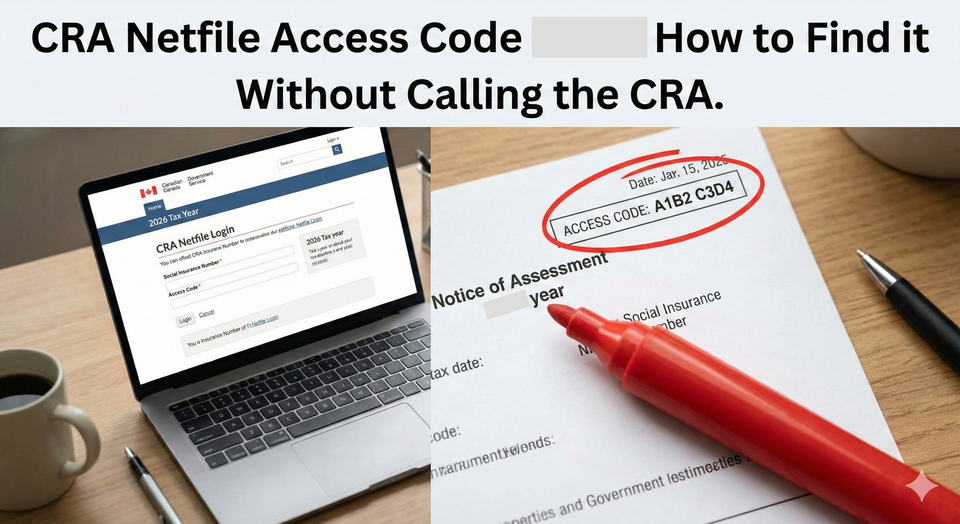
Where is the CRA Netfile Access Code located on my documents? Your unique 8-character Netfile Access Code (NAC) is located on the top right-hand corner of your most recent Notice of Assessment (NOA). It is found directly under the "Notice Details" box, labeled as "Access code." If you do not have a paper copy, you can find it digitally by logging into CRA My Account, navigating to the "Tax Returns" tab, and viewing your most recent NOA. Note: This code changes every year and is only issued after you have filed at least one Canadian tax return.
2. Digital Retrieval: How to Find it in My Account
If you are already logged in (or using the Bank Sign-In Partner hack we covered), finding the code is a 3-click process.
- Navigate to Tax Returns: Once inside My Account, click the "Tax Returns" link in the main menu.
- View Notices of Assessment: Look for the "Notices of Assessment and Reassessment" section.
- Open the 2024/2025 NOA: Click on the most recent year you successfully filed.
- Locate the Sidebar: On the digital NOA, the code is often in a specific "Notice Details" box at the top right.
Warning: If you have been Locked out of your CRA account, you cannot use this method until you reset your access.
Access Code Hacks
This deep dive identifies the specific "Self-Serve" maneuvers that bypass the CRA helpdesk entirely.
1. The "Skip the Field" Strategy (The Biggest Secret)
Is netfile access code mandatory."
- The Reality: Most tax software (TurboTax, Wealthsimple, H&R Block) makes the NAC box look like a requirement.
- The Hack: It is NOT mandatory for the majority of taxpayers.
- The Strategy: The NAC is primarily used as an "added level of security." If you enter it, the CRA can use your current return to verify your identity the next time you call them.
- The Move: If you are in a rush and can't find your code, leave the box blank. Your return will still be accepted, and your CRA Refund will still be processed on the same timeline.
2. The "First-Time Filer" Exception
Why don't I have a netfile access code.
- The Hack: You don't have one because you've never been "Assessed."
- The Strategy: The NAC is generated after your first return is processed. If 2026 is the first year you are filing in Canada (e.g., as an International Student filing a Nil Return), you simply leave the field blank.
- The Move: Do not waste time calling the CRA to "request" a code if you are a first-time filer; it doesn't exist yet.
3. The "Web Retrieval" Tool (The No-Login Hack)
If your CRA My Account is locked and you have no paper files, use the CRA's standalone retrieval tool.
- The Hack: The "NETFILE Access Code" web form.
- The Strategy: You will need three things: your SIN, your Date of Birth, and the exact amount you reported on Line 15000 of last year's return.
- The Move: If you have a copy of your 2024 tax return (the one you filed, not the NOA), you can use that Line 15000 number to generate your 2026 NAC instantly on the CRA website without a login.
4. Business Owners: The GST/HST Access Code Trap
Is netfile code same for GST."
- The Reality: No. The personal NAC is 8 characters (letters and numbers). The GST/HST Access code is 4 digits (numbers only).
- The Strategy: If you are a Gig Worker (Uber/Skip) filing a business return, you need the 4-digit code.
- The Move: You can find this in "My Business Account" under the "GST/HST" tab. It does not appear on your personal NOA.
5. The "Notice Issued" Countdown
If you just filed your return yesterday and want to file an adjustment, you'll search for how long to get new access code.
- The Hack: The NAC updates the moment your return moves to "Assessed" status.
- The Strategy: If you are filing multiple years, file the oldest one first. Wait for the Refund Status "Assessed" to appear.
- The Move: The moment that status appears, your new NAC for the next year is active in the "Tax Returns" tab of My Account.
4. Summary: NAC Retrieval Cheat Sheet (2026)
| Method | What You Need | Time |
| Paper NOA | A physical file from last year. | 30 Seconds |
| CRA My Account | A working login (or Bank Partner). | 2 Minutes |
| Web Retrieval Tool | SIN + Line 15000 from last year. | 5 Minutes |
| Skip it! | Just your SIN and DOB. | 0 Minutes |
| Calling CRA | Extreme patience (1-800-959-8281). | 2 - 3 Hours |
Find CRA Netfile Access Code
How do I find my CRA Netfile Access Code (NAC) for 2026 without calling? You can find your 8-character access code on the top right-hand corner of your previous year’s Notice of Assessment (NOA). If you don't have the paper copy, log into CRA My Account, go to the "Tax Returns" tab, and view your most recent NOA digitally. Alternatively, if you know your SIN and the amount from Line 15000 of your last return, you can use the CRA’s online retrieval tool. Note: Entering the code is optional for most tax software; you can typically Netfile without it.
Frequently Asked Questions (FAQ)
Q: Does my Netfile Access Code change every year?
A: Yes. The CRA issues a brand-new code every time they process a tax return. You must use the code from the most recent NOA you have received.
Q: I’m an international student. Do I have an access code?
A: Only if you filed a return last year. If this is your first time filing a Nil Return, you do not have an access code yet.
Q: My tax software says the code is "invalid." Why?
A: Ensure you aren't confusing the letter "O" with the number "0," or the letter "I" with the number "1." Also, verify that you are using the code from the 2024 or 2025 assessment, not an older one.
Q: Can I get my access code if I never filed taxes before?
A: No. You must file at least one return to be entered into the system and generated a code. First-time filers always skip this field.
About the Author
Jeff Calixte (MC Yow-Z) is a Canadian labour market researcher and digital entrepreneur specializing in government benefit data and cost-of-living support. As the founder of CanadaPaymentDates.ca and BetterPayJobs.ca, Jeff helps newcomers, students, and workers navigate the Canadian social safety net—from tracking CRA payment schedules to finding entry-level work.
Sources
- CRA: Netfile Overview and Access Code Retrieval
- TurboTax Canada: What is the Netfile Access Code (NAC)?
- H&R Block: Finding and Entering your NAC in 2026 Software
Note
Official 2026 payment dates and benefit amounts are determined by the Canada Revenue Agency (CRA) and provincial governments. While we strive to keep this information current, government policies and schedules are subject to change without notice. All data in this guide is verified against official CRA circulars at the time of publication and should be treated as an estimate. We recommend confirming the status of your personal file directly via CRA My Account or by calling the CRA benefit line at 1-800-387-1193.